Time-Tested Tips and Time-Saving Techniques for Editors: Settings, Media Management, Audio, Tools, and Layoffs by Daniel Gaucher
One afternoon, a producer and I were enjoying a pleasant lunch on a sunny café patio, when she made the strangest comment: “We brought you onto the project, and instantly knew you were a professional when you pulled out that CD and put your settings into the Avid.” What?! Was she kidding?
Doesn’t every editor carry his or her settings, a demo reel, some graphics, and maybe even a sound effects library on them? In this day and age of the flash drive and the recordable DVD, there are no more excuses for not carrying your settings, and whatever other tools will help streamline your editing.
Mulling over that funny discussion, it occurred to me that there are many small things that professional editors take for granted, actions they do daily without thinking, tools they use repeatedly without pausing. With that being said, here’s a short list of things I don’t usually think about, but you may want to.
1. Settings
One of the first things you should do on any NLE is to begin to observe your patterns. Always reaching for a specific command? Always having to rearrange windows every time you get on the machine? Save your settings. Learn to use the command palate function or keyboard layout function to assign often-used commands to your keyboard or buttons. Make different versions for when you edit on one monitor or two. After everything is where you like it, save that layout, and then, locate your user file. Copy it to a flash drive, burn it to a CD, copy it to a network. Take it with you. Feel free to make tweaks and changes, and update your settings file frequently.
2. Media Management
There are two levels of media management: file management and project management. I’d like to briefly talk about the latter.
Are you the type of person who puts things back where they belong, or the type of person who leaves things lying around? Where are the keys? Where did I put those shoes? You’ve been told throughout your childhood to put stuff away for a reason.
You may assume you can mentally track all the elements in your project, but think of that Discovery Channel documentary you will be cutting in the future. An average one-hour documentary will have the following elements: 40 source tapes or more, scratch narration, final narration, almost a hundred pieces of music, sound effects, multiple graphics, stills, and animations. Over an average nine-week offline you will cut five acts seven or eight times over, meaning you have to track 40 sequences to ensure you can locate the latest cuts.
Here are a few suggestions for methods I use to help manage this mountain of information.
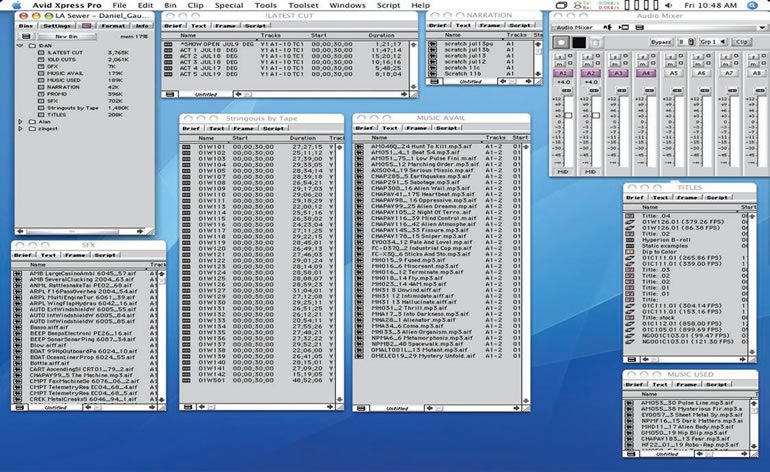
First, the almighty bin. Simple and effective. Create a consistent system to keep these elements apart and orderly.
I create the following bins: Latest Cuts, Old Cuts, Source Tapes (one bin each or one bin with multiple stringouts), GFX, SFX, Music, Narration (scratch and final), and Titles (a catch all bin for effects, etc.).
Secondly, keep your timeline consistent. Minimize the number of tracks you need to create. Cut similar elements onto specific tracks. For example, A1 and A2 might be primary audio, A3 might be narration, and A4 might be room tone. Keep music on tracks A5, A6, A7, A8, and sound effects on tracks A9, A10. Make sure that items that require stereo, like music or sound effects, get two tracks (stereo). Place a red dot or marker at the head of your cut and list your track assignments. Your sound mixer will appreciate your good housekeeping.
Lastly, everyday when you sit down at your project, duplicate the sequence you are working on and drag that copy to your “Old Cuts” bin. Add the current date to the file name of your current sequence, and only then, begin cutting. At the end of the day BACKUP the project to your flash drive, another hard drive or a network. Like your settings, it doesn’t hurt to be carrying multiple copies of your project. Just double-check the file creation date to make sure you are using the latest one when you begin the next time.
3. Audio
There is nothing that adds more momentum to your edit than music and sound effects. Isn’t it great when you’re listening to a song, and then, that chorus kicks in? The guitar riff, the great beat, and the catchy lyrics? Think musically when you cut. Find the rhythm in what your subject is saying or doing. When can you put a little
pause in for a guitar lick or a cool beat?
Create interplay between your video and the music bed underneath. I often say that my edits are just a series of three-minute music videos strung together. That doesn’t say a lot for current attention span! Remember, don’t use rubber banding if you are going to sound mix elsewhere. Make cuts in your audio tracks and put audio dissolves on
them to change volume. Your sound mixer will thank you for that, too.
4. Tools Although all NLE’s come with many, many great functions, you will tend to notice a few gems you go to time and again.
For myself, there is the “Extend” command, fantastic for creating immediate L-cuts. I dropped the command on my keyboard.
When I park the playhead where I want to make the L-cut, I just highlight the video track, hit the in-point, clear the out-point, and hit the Extend key. Three quick and easy clicks to a perfect L-cut. Another simple but enormously effective trick lies in the power of the shift key.
5. Layoffs
Even as a professional editor, you are still forever a student of new technology and time-saving techniques. I was cutting a History Channel show for a producer, when it came time for us to layoff our preview cut to DVD. While I was mentally calculating the compression time and recording time needed to burn a DVD on the computer, my
client just patiently sat and smiled.
“I think the burn might take a couple hours,” I said, to which he replied, “Just plug this in.”
He had brought a consumer DVD recorder with built-in 80 gig hard drive – the same kind of machine you would use
to record your favorite shows off television.
What simplistic brilliance!
We plugged the video and audio cables into the video output card in the back of the computer and played the piece in realtime, recording it to the DVD recorder’s hard drive. Then, without wasting precious computer time, he was able to burn multiple DVD copies for the broadcaster.
He had the cuts from his last three shows on that hard drive also. Anyone needed a copy of his past works? Easy. Just
burn a DVD, right there and then, off the deck’s hard drive. Smart. Why didn’t I think of that?
Necessity is the mother of invention, and over time you will accumulate many shortcuts, techniques and solutions. I
was discussing this topic with another professional editor with whom I’ve worked any times before. We were reminiscing about the many lessons learned over the years, and how after a while it all comes down to one thing: having a clear and consistent system.
“The Golden Rule,” he said, “is that if I die on the way home tonight, then someone could step right in and finish the project.”
That’s a true obsession for organization, and maybe a little bit of an insane work ethic. Whoever said editors weren’t perfectionists?
Daniel Gaucher is an Assistant Professor of Visual and Media Arts at Emerson College. He established himself in the
production world as one of the original editors for the hit series, Blind Date. Since then, he’s crafted a series of successes including 5th Wheel, Queer Eye for the Straight Guy, and Extreme Engineering. His work has aired worldwide on NBC, MTV, Bravo, A&E, UPN, Spike, VH-1, TLC, Discovery, PBS and the National Geographic Channel.