Reference: StudentFilmmakers Magazine, May 2007. Staying Legal in a Multicolor World: Some of the issues related to color space, formats, and conversion between formats… by Steve Holmes. Pages 40 – 43.
Monitoring the color gamut in today’s video system is not a routine activity for a lot of people working in the video industry. But, if you create video with a graphics workstation or perform technical or creative adjustments on cameras, you are keenly aware of the potential problems that can occur when the R’G’B’ color gamut is violated.
Those glorious, vibrant colors you crafted lose their brilliance when transmitted or recorded, destroying the visual impact you achieved on a computer display or a studio monitor. Many facilities are “hybrids” working with a variety of different formats – analog or digital, standard definition or high definition – that complicates this process further. We work in a multiple color space world, dealing with both SD and HD formats, NTSC composite, Y Pb Pr component and RGB, then conversion between formats and color space.
A brief background will help explain some of the issues related to color space, formats, and conversion between formats in digital television systems. For example, waveform displays have historically been used to validate gamut compliance in NTSC systems. But as you will see viewing a Y, Pb, Pr component, waveform tells you very little about things like how much NTSC Peek chroma you will create. We have content in the form of RGB Computer Graphics, Y Pb Pr and NTSC. Each one has its own color space, and not everything we do in one format or color space can be converted to the other formats and remain legal.
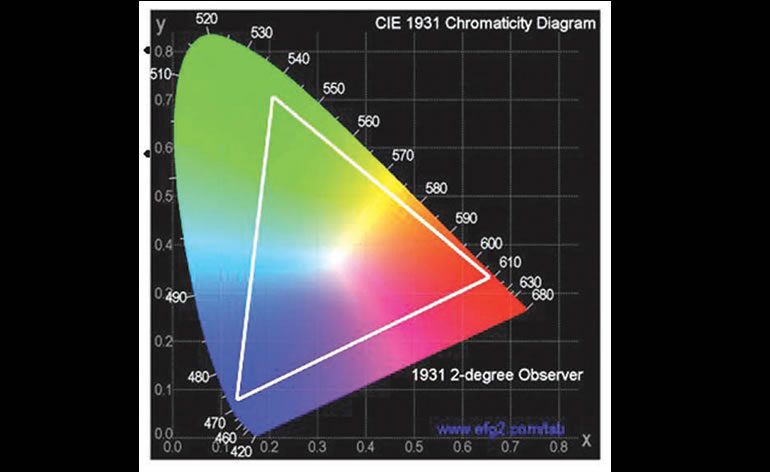
Chromaticity Diagram
Monitoring the color gamut of a component video signal is not as much of a routine activity as is should be for the majority of those working in the video industry. To prevent the undesired impact of color gamut violations, there are various displays to simplify the operator’s and engineer’s tasks.
Most everyone is familiar with looking at an NTSC waveform. What we have been dealing with all these years is a two channel system where the Chroma information is superimposed (riding) on top of the luma channel. Now in Component video we are dealing with 3 independent waveform channels: Y Pb Pr, and also, 3 channels or waveforms in RGB. The CIE 1931 Chromaticity diagram shows all possible colors that are discernable by the human eye. The important thing to be taken from this figure is that television color spaces such as NTSC, and the like are subsets of this range of colors. We had to pick a Particular Green, a Particular Blue, and a Particular Red to be used in today’s color television system (See white triangle in Figure 1). Any color that falls outside of this triangle cannot be reproduced by today’s television systems.
Y Pb Pr ColorBars
The traditional approach to gamut monitoring, the waveform display, does not tell what is going on in other color spaces. A digital component video operator must make six total checks to validate gamut, looking at the white levels of each component and then the black levels of each component. (See Figure 2.)
Vectorscope Display
A Vector scope shows both of the color difference signals in a NTSC or component signal. The B-Y signal causes horizontal deflection and R-Y causes vertical deflection. This results in a display having six peripheral dots and two central dots. The central dots result from white and black bars which are not colors and in which color difference for each is zero. What the Vector scope will not tell you although is how much Peek Chroma that you are creating in a NTSC signal. (Figure 3.)
Y Pb Pr Waveform View
If you look at the waveform shown in Figure 4 it is very difficult if not almost impossible to tell how much NTSC peek chroma is going to be created by this signal. A component signal can easily produce 130 IRE of peek chroma. The maximum amount of chroma allowed in NTSC is 120 IRE due to the RF modulation process. Likewise a component signal can generate a RGB signal that is out of Gamut, more on RGB in a moment. Even if the video you are working on is HD you have no control of how it will be viewed at the end of the food chain. It could be down converted to composite for viewing at some point.
Program material will still be transmitted as a composite signal in a hybrid plant or in distribution for many local markets like Cable and Satellite. The requirements are different for keeping this signal legal. To monitor the component signal in composite space, the signal can be applied to a composite encoder then to a distribution amp.
The composite signal is then measured and monitored using a familiar analog waveform monitor and vectorscope. But this method introduces several unknowns, the setup of the composite encoder, the levels of the DA and the calibration of the Analog waveform monitors, and the potential for error is great. The Arrowhead display shows engineers and operators to easily see out of gamut conditions in composite color space without the need of processing the signal through a composite encoder. Figure 5 shows how the Arrowhead display is constructed for NTSC color space.
The great thing about the Arrowhead display is that it’s done mathematically, so it can’t be in error. The Arrowhead display plots luma on the vertical axis, with blanking at the lower left corner of the arrow. The magnitude of the chroma subcarrier at every luma level is plotted on the horizontal axis, with zero subcarrier at the left edge of the arrow. The upper sloping line forms a graticule indicating 100% color bar total luma + subcarrier amplitudes. The lower sloping graticule indicates a luma + subcarrier extending toward sync tip (maximum transmitter power). The electronic graticule provides a reliable reference to measure what the luminance plus color subcarrier will be when the signal is later encoded into NTSC or PAL. An adjustable modulation depth alarm capability is provided to warn the operator that the composite signal may be approaching a limit. The video operator can now see how the component signal will be handled in a composite transmission system and make any needed corrections in production. Normally for NTSC transmission the threshold is set between 110 and 115IRE because values over this limit can cause problems at the transmitter in the form of sound buzz. Figure 5 shows an NTSC SMPTE Color bar signal that falls within the limits of the Arrowhead display. However applying a 100% color bar signal as shown which is legal and valid in R’ G’ B’ space, causes the limits to be exceeded in the composite NTSC space.
Four Tile Waveform View
As seen in Figure 7, a four tile component waveform view, the signal shown in the lower left quadrant is a perfectly legal component Y Pb Pr signal, but when viewed as a Y RGB display in the upper left quadrant you can see that the Red channel is at almost 800mv. The Diamond display in the upper right quadrant shows the same Red error.
Diamond Display
In creative and operational environments where monitoring the RGB gamut limit is critical, the Diamond display is unbeatable. Conventional waveform monitor display modes, such as parade and overlay, are great for measuring signal levels, but gamut limit violations don’t stand out like they do on the Diamond display. The Diamond display provides gamut limit monitoring with any signal. The Diamond display consists of two XY plots: green versus blue in the upper diamond, and green versus red in the lower diamond. In the upper Diamond any signal that is a legal Green Blue color will stay inside of the diamond created by the upper Diamond. Likewise the lower portion of the Diamond checks the legality of the Green Red colors. The plots are bounded by a graticule indicating nominal gamut compliance between 0 and 700mv. By separating the diamonds, it is easier for the user to visualize black gamut errors as shown in the split Diamond.
Signal monitoring in the RGB color space does have several very important applications. Even though signal transmission in RGB is rare, many creative and operational controls continue to bear the labels R, G and B.
Computer graphics workstations and paint systems operate in RGB color space and are among the most frequent sources of illegal video. Camera control units (CCUs), telecine, color correctors and gamma correctors also employ RGB color space controls. Monitoring these types of systems is an obvious application for the Diamond display.
Conclusion
The Diamond display excels in several areas for R’G’B gamut, however it is not the answer to every measurement question. Today’s video operators need to use a whole host of tools: Arrowhead, Waveform, Vector, and Diamond Displays, as well as being visually pleasing. While virtually all component video transmission occurs in one of the standard color difference formats widely used today, viewing those signals in the RGB color space is still a necessity in some situations. It is much harder to know how much Peek Chroma you are creating. As computers become more widely used in video applications, the possibilities of creating illegal video signals increases — and Diamond is the best tool for keeping track of RGB gamut violations. Performing color correction adjustments, gray scale tracking adjustments or black balance adjustments on a CCU are additional tasks that can be simplified by the Diamond display. The Arrowhead display provides a means for a digital hybrid facility to easily ensure the signal is valid for transmission in a Composite environment and simplifies the operators’ task all within the digital domain.
Graphic charts courtesy of the author and Tektronix.
Steve Holmes has over 20 years of video experience. He spent 20 years with GTE/Verizon installing, teaching, engineering, and managing Video and CATV systems; and he taught video transmission and video engineering to non-video engineers. He was involved in one of the first Video on Demand, Near Video on Demand, FTTH (fiber to the home), FTTN (fiber to the node) and HFC (hybrid fiber coax) trails before the development of digital video compression systems. Today he works as a Sr. Video Applications Engineer for Tektronix consulting and teaching test methodologies for Broadcast, Studio, Cable and Manufacturing for customers based in the Western United States and Western Canada.