By Gregory Singer
Love the look of 35mm but have limited resources? Gregory Singer shows how to get shallow depth of field from a small-sensor camera like the DVX-100A.
So you want to make a great looking movie but you have limited resources? Like any film fanatic out there, you love the look of 35mm, but you don’t have a spare $50,000 for camera and film stock? How can you make your movie look more “Hollywood” if you don’t even have the money for a Red Rock 35mm adapter? Everyone has their own theories about what the differences between film and digital are, but the overwhelming consensus is the major differences are depth of field, color rendition, and contrast. Another reason is shot selection and frame composition, but that is a separate discourse. Contrast and color rendition are dependent upon the camera model, but depth of field applies to every camera. Personally, I love the Panasonic DVX-100A because of the way it captures colors and the manual controls for the zoom and focus. It also has a plethora of controls to tweak the image exactly to your liking. Whichever camera you decide to purchase, you need to learn how it works and how it responds to changes in settings and environments.
Six months ago I obtained a depth of field plug-in for Adobe After Effects, Premiere Pro, and Final Cut Pro. I wanted to learn to use it, so at the spur of the moment I grabbed my camera and my friend, Shanna Withers, and took some test video of her acting in a spontaneous scene. Our purpose was to create a short clip that looks very cinematic, like it was taken from a much larger piece, so that I could play around with Adobe After Effects and she could use it on her reel. Here are some of the techniques I used.
1. Zoom
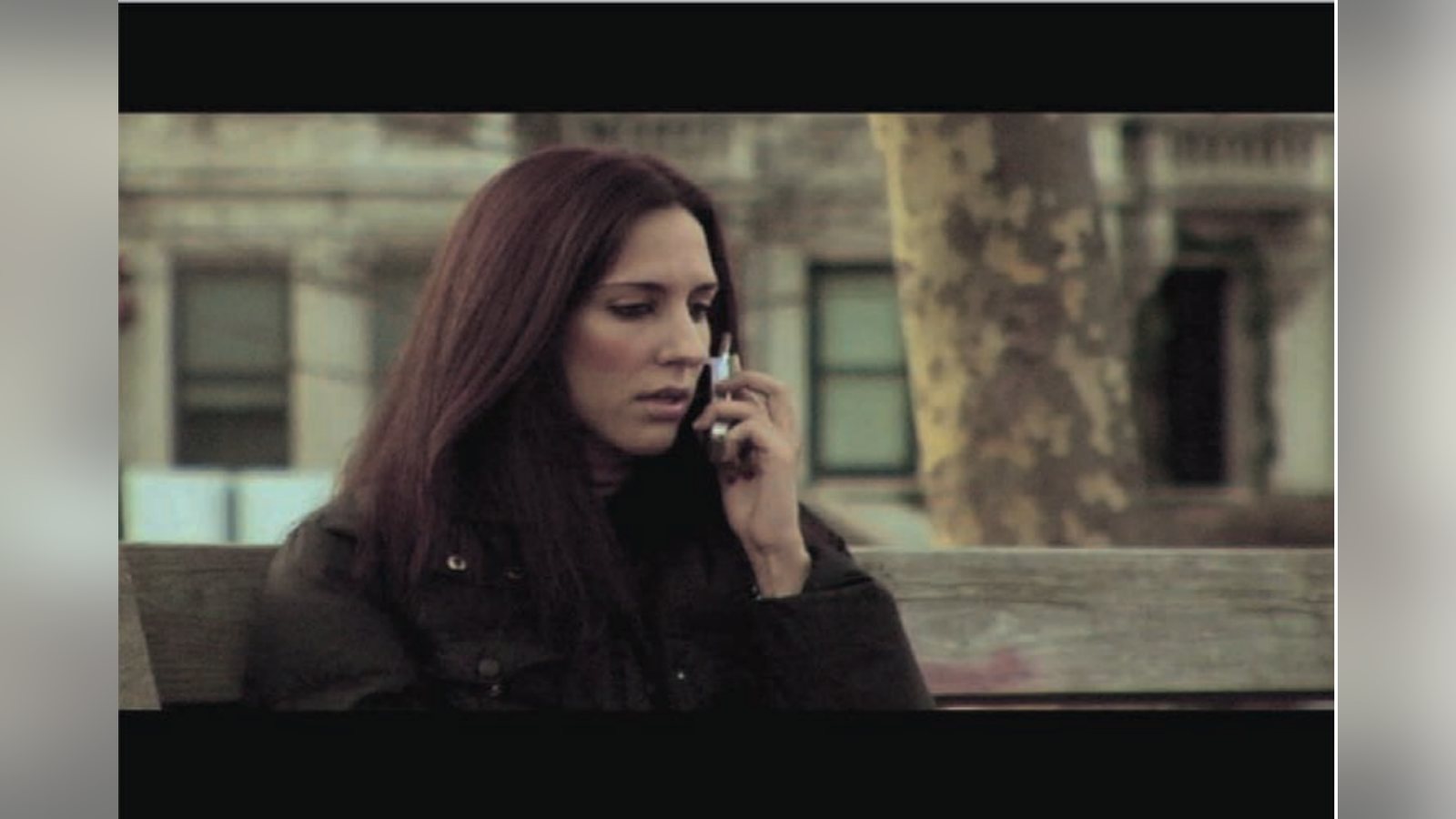
Even though lenses on digital cameras have a deep depth of field, it is possible to give the impression of a shallow depth of field. The simplest way is to zoom all the way in and then move your camera back until you get the desired framing. The depth of field isn’t altered, but zooming exaggerates any out of focus scene elements, giving the feeling of a shallow depth of field. In the first photo you can see the result of placing the camera (DVX-100A) 20 feet away and zooming all the way in. The image has a very pleasing look and the background is very soft.
2. Move the background further back.
If possible, move the actor further away from the background. If the background behind an actor is further from the camera then obviously it will be more out of focus. If you compose the scene properly, the audience won’t be able to tell and you’ll get a more cinematic image. In the first photo the apartment buildings are about 100 feet behind Shanna.
3. Open the iris.
If the camera iris is wide open then you will get the shallowest depth of field possible. Open the iris as wide as possible, and use neutral density filters to stop down the light so the image is not overexposed.
Quick Tips for Creating a More ‘Cinematic’ Image
Intensity is the world’s first HDMI capture and playback card for Windows and Mac OS X systems. If you want to go beyond the quality limits of HDV or you need big screen HDMI edit monitoring, then only Intensity will let you upgrade to true Hollywood production quality.
Beyond the Limits of HDV
Working in HDTV is exciting, however, HDV’s heavy compression and limited 1440 x 1080 resolution can cause problems with quality and editing. Intensity eliminates these problems using direct HDMI capture from the camera image sensor, at full 1920 x 1080 HDTV resolution and uncompressed video quality.
Cinema Style HDMI Monitoring
If you’re editing in DV, HDV, uncompressed or JPEG video, you can use Intensity’s HDMI output for incredible digital video monitoring. Now you can use big screen televisions and video projectors for breathtaking cinema style edit monitoring and experience the true quality of your work. Multi Camera HD Production Studio Perform live production with 2 Intensity cards and cameras plugged into your system using the included On-Air software.* On-Air sync’s HDMI cameras, handles monitoring and recording, plus is so easy to use, it’s ideal for education, theater, corporate training and more.
Use your Favorite Software
Intensity is fully compatible with both Adobe Premiere Pro on Windows and Apple Final Cut Pro on Mac OS X, as well as After Effects, Photoshop and many more. Intensity also works in 1080i HD, 720p HD, NTSC and PAL for worldwide compatibility. 4. Use a plug-in.
For a shot in the test shoot with Shanna, I used a depth of field plug-in for After Effects. In pictures 2 and 3 you can see the difference it makes. To get the best effect, you can create a focus map to tell the plugin how much to apply the effect to each pixel. This works best with a static shot, but it is possible to track the background in a moving shot and still get acceptable results.
In this shot, the camera was static on a tripod so it was relatively simple to create the focus map. I took a still from the sequence and imported it into Photoshop. There I converted it to a grayscale image and erased (made black) all the parts of the image I wanted to keep in sharp focus, like around Shanna and the bench. I was very careful on the object edges, like the slats of the bench, so that the image looked realistic. In the background, I used the blending tool and the eraser to rough in the areas that I wanted to be more out of focus. On background object I applied focal lengths that made sense. If you look closely at the three trees, the one on the far right is more out of focus than the ones directly behind Shanna, yet it is not as out of focus as the people are. The more care you take in roughing out the focus map the better results you will get.
The shots from this camera angle are the only ones where I used the depth of field plug-in. The other shots use the zoom technique and proper framing. The resulting video file is titled “TEST – Shanna Phone Call” and is viewable on the Filmmakers Networking Community site at studentfilmmakers.com. It can be downloaded at http://networking. studentfilmmakers.com/gregorysinger.
Contrary to popular belief, small sensor digital cameras have the ability to create great looking images. With proper planning and forethought, it is possible to create a movie that people are amazed by, and one that leaves them thinking, “Did he use film?”
Gregory Singer is a documentary filmmaker and editor. He runs Stallion AV Productions that produces independent works about sociological issues. He is currently producing Live Indie TV for PBS and is in pre-production of Seoul Search, a documentary feature about the good, the bad, and the ugly of international adoption.
Keep learning filmmaking
Want more lessons like this? Join StudentFilmmakers free for live webinars with working pros, and stream on-demand filmmaking classes in cinematography, directing, screenwriting, sound and post.