By Mark Kerins
Bad sound is the fastest way to say student film. Mark Kerins gives seven ways to plan, record and mix a soundtrack that sounds professional from day one.
Any number of things can “label” a movie as “student work.” And (let’s be honest) even though you obviously know you made a “student film,” you still don’t want it to seem like one, especially when that moniker is applied in the pejorative sense, as in “That movie was so…. student film-y.” Some of the giveaways that distinguish your work from Hollywood’s, you can’t do anything about – you simply can’t compete with multi-million dollar productions when it comes to big-name stars, expensive visual effects, dangerous stunts, or many of the other elements that millions of dollars can provide. But strangely enough, some of the problems most common to (bad) “student film” are relatively easy – and cheap – to overcome, as long as you know how to avoid them.
Bad audio, if not the single most frequent problem with student films (as well as low-budget film in general), is certainly near the top of the list. If you can avoid the common pitfalls that lead to a bad soundtrack, your films will gain an immediate advantage over those of many of your peers. Of course, that doesn’t mean that you will automatically make “good films.” But it does mean that your films – unlike many others – will at least have the chance to stand and compete on their own merits rather than being immediately disregarded thanks to poor-quality audio.
So how can you end up with a good-sounding film? The tips below are not comprehensive, but hit many of the novice (and even experienced) filmmakers’ most frequent mistakes, and will at least set you on the right path. And, as with just about every aspect of filmmaking, note that ending up with good audio requires planning and thought before you start shooting.
Tip #1: Think about sound design EARLY.
This is one of the few places where you have an advantage over many Hollywood productions, and you should take advantage of it. You know from the start who’s going to be working on your movie, and you (unlike Hollywood filmmakers) can talk out ideas with your crew days, weeks, or months ahead of time without it costing you thousands of dollars. Your sound designer might have a great idea for how to convey something in the soundtrack that will save you having to shoot the multiple shots it might have taken to do the same thing visually. Or they might offer suggestions about sound effects to record on set, which will save time in post-production and likely result in effects that sound more natural to the environment. Whatever their input, getting it early will help you make the best use of your resources.
Tip #2: Think about sound when selecting locations.
Sure, that back alley right next to an airport looks great, but you could save yourself a lot of headaches by shooting in the almost-as-good-looking – and QUIET – suburban alley two miles away. Sometimes you’ll have to compromise the sound to get the right location or shot, but be aware you’re doing so and make sure it’s really the best option overall. Otherwise, you may be making your life a little easier in one area in exchange for weeks of agony in post-production.
Tip #3: Have a dedicated audio crew on set.
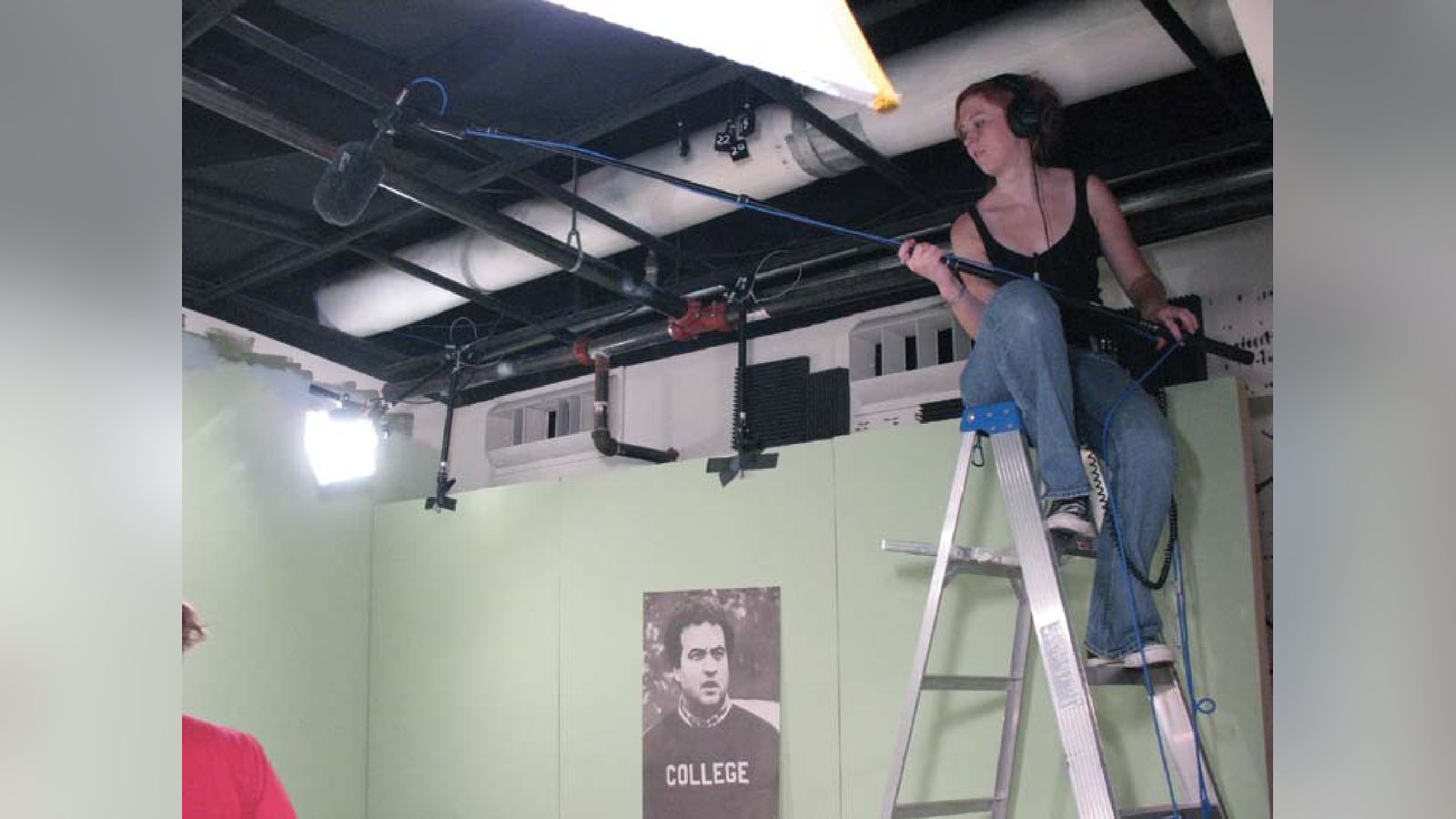
It sounds obvious, but far too many short-handed productions don’t have anyone paying full-time attention to the sound. So it falls to the assistant director, or a grip, or (worst-case scenario) the director to serve as the boom operator, listen for background noise, and so on. The audio problems that inevitably result from
small package
connect professional audio gear to your camcorder for superb sound
ideal foR today’s compact camcoRdeRs!
these situations are often blamed on whoever ended up handling audio duties, but that’s not really fair. When one person has multiple full-time jobs to do on set, it’s hardly surprising that he/she can’t do all of them perfectly all the time. On the other hand, if someone on set is focused solely on acquiring good audio, it’s very likely that any audio problems will be caught and fixed immediately. And, of course, the more experienced your on-set audio crew, the less likely that you’ll encounter problems with the production audio.
Tip #4: Take the TIME on set to get good audio.
It’s a strange quirk of film sets – there’s always time to tweak lighting and do another take for camera or performance, but anytime there’s a delay for audio the crew starts to get annoyed. Unless, that is, you as the director make it clear that it’s worth it to you to take an extra minute to get good production audio. You can also help avoid audio delays in the first place by keeping the sound crew “in the loop” as to what’s going on. If they know where the actors and cameras are going to be ahead of time, they can figure out a plan ahead of time. Finally, if you’re working with a good crew, trust them. If your recordist tells you that the audio for a take was really awful, give them a minute to adjust whatever needs to be fixed and then give them another take. The worst thing you can do for your finished movie is to assume that major audio problems will be “fixed in post.” Completely fixing the problems in bad production audio is at best time-consuming (and usually expensive) and at worst impossible.
Tip #5: The camera is NOT an ideal piece of audio gear.
Okay, you’re smart enough to recognize why a video camera’s onboard microphone is not likely to provide very good sound. It’s moving with the camera, it’s not always close enough to the actors to pick up clean dialogue, etc. So, you put a mic on a boom, get it in proper position relative to the actors, and hear good sound coming out of it. So far so good. But then… you run it directly into the camera. To be sure, this probably won’t be a technical problem – today’s digital cameras do generally have high-quality audio recording capabilities, so if you send them a good signal they’ll record it well. The problem is that now you’re relying on your camera operator, who probably has his/her hands full with that job already, to watch and adjust audio levels, to listen to headphones to judge audio quality, and to call for retakes on audio where needed. And that’s all while his/her attentions should be focused on getting good images. A better option that still doesn’t require syncing in post? Run your boom to a small mixer (operated by your production recordist) and then send the output from that to the camera. A good recordist will be able to set levels on the camera at the beginning of the day and then adjust things on the mixer without ever needing to touch the camera again (which will also keep your camera operator happy). Another option which some people prefer (and which is used anytime you’re shooting film) is to run “dual-systems,” where you record the audio separately (to DAT, MiniDisc, hard disk, etc.) from the picture. This method has distinct advantages on set. It eliminates the need for the audio/camera crews to be connected at all and also allows the recordist to hear any problems with the actual recorded audio. However, it requires more time in post-production, since picture and sound have to be synced back together.
Tip #6: EDIT your sound.
Let’s say you follow all the above tips and get (mostly) great sound on set. There will still probably be the occasional bit of audio that doesn’t sound right – maybe a plane flew by overhead, or a wireless microphone cut out for a moment, or an actor fumbled a line. Go ahead and edit together the pieces of good audio you have to cover these problems. Take out noise, add in sound effects, put in room tone where necessary (of course you recorded room tone on set), steal bits of audio from unused takes, etc. Just as you edit the image track to get the best possible parts of all the takes together, don’t be afraid to play with the soundtrack to get it sounding as good as possible. And when necessary, don’t hesitate to try recording new audio takes of sounds that are not good enough to use in your final piece. How easy it is to do massive amounts of ADR will depend on the facilities available to you, but even a very simple setup is fine for re-capturing just a line or two.
Tip #7: MIX your sound.
Once you’ve got your picture cut locked and all the desired sound elements in place, take the time to really tweak the mix a bit. This encompasses a couple of things, none of which require you to be an audio expert. For one, it means adjusting audio levels to highlight what’s important at each point of the movie. Is it the music? The dialogue? The atmosphere? Whichever it is, the mix should draw our attentions to that element. Mixing also means using simple processing to enhance your sounds where appropriate. For instance, if an actor sounds too nasal, you could EQ his voice a little to give it a more pleasing tone; if a sound effect was too obviously recorded in a studio, add a little delay or reverb to make it sound more like it originated in the space we see onscreen. Most of all, mixing means listening to the soundtrack intently (ideally on a good set of speakers, not on headphones) to make sure it’s serving your film as well as it can. And you don’t have to buy expensive new software to do your editing/mixing. Although most professionals in the film industry use a program called Pro Tools for audio work (and there is an academic version available with student pricing), common picture editors like Final Cut Pro and Avid also provide audio editing/mixing functionality, and even freeware like Audacity offers you a lot of options. The point is that there’s probably a program already on your computer that can help you improve your soundtrack if you know how to take advantage of it.
You may have noticed that a lot of these tips have a theme in common, and that’s no accident. The single most important tip is simply: think about sound throughout the entire filmmaking process. You already think about the image the whole way through (from shot list, to cinematography on set, to editing); just extend that thought process to the aural half of your audiovisual media. If you can do this, whether or not your film ends up with a “great” soundtrack (which requires a LOT of creativity, technical skill, and luck), you’ll at least have minimized the chances that it will sound like a “student film” – the rest will be up to you and your own creativity.
Good luck and happy shooting!
Mark Kerins earned a Ph.D. in Radio/ TV/Film from Northwestern University for his project Rethinking Film for the Digital Sound Age; his work continues to focus on sound design, surround sound, and building dialogue between critical studies and production. He currently teaches film/video production and post-production in the Division of Cinema-Television at Southern Methodist University in Dallas.
Keep learning filmmaking
Want more lessons like this? Join StudentFilmmakers free for live webinars with working pros, and stream on-demand filmmaking classes in cinematography, directing, screenwriting, sound and post.