Reference: StudentFilmmakers Magazine
Final Cut Pro 4.5 HD makes editing easy with its mouse based GUI (Graphical User Interface), but professional editors know that making quick edits means using keyboard shortcuts as well. FCP allows you to easily set up several different configurations of shortcuts that will help you to fly through your edits.
Here’s how:
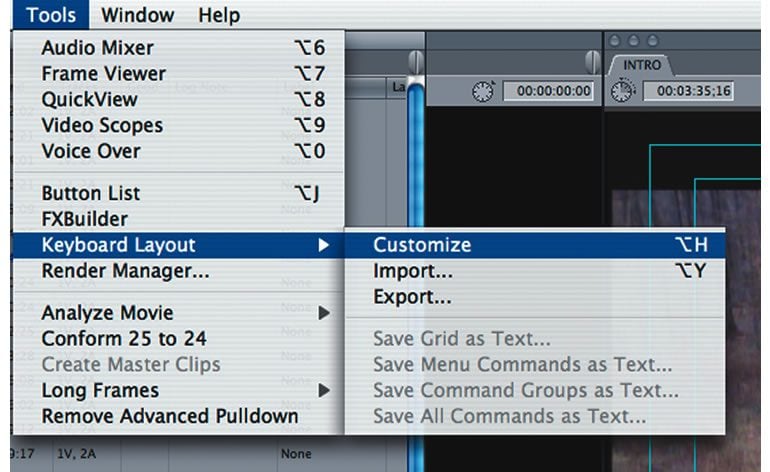
1. Open FCP and open your project. In the menu bar, click on “Tools > Keyboard Layout > Customize” to open the
keyboard map.
2. Take a look. Lots of keys, a menu on the side, and a bunch of tabs. There are a few steps to actually mapping actions to keys. As an example, we’ll take the command for a speed change and map it to the “E” key using the “Command” key modifier. (It’s probably already assigned to something, but I like having it on the “E” key with the
“Command” modifier).
3. In the right sidebar, use the scroll bar to scroll through the command categories. Click on an arrow to see the options each category contains. Notice that many commands already have keyboard shortcuts assigned to them.
You can change any of these as long as the lock down at the bottom left of the window is open.
4. Click on the “Cmd” modifier tab in the keyboard map window.
5. Head on over to the category list, and click on the arrow next to “Modify.”
6. Here you’ll see all the options from the “Modify” menu that resides on the FCP menu bar. Scroll down to find the
“Speed…” command.
7. To map the command to the key, simply click the name and drag it to the key you want to map it to – in our case, the “E” key.
8. Close the window and try it out…Select a clip in the timeline or the canvas window, then type CMD + E. The speed change dialog box should appear. There you have it!
The ability to map your own shortcuts to keys on the keyboard can help you to develop a shorthand that will undoubtedly make you a better, more efficient editor.
Chris Cavallari has been working in television, video, and film for 12 years as a lighting cameraman,
cinematographer, director, video editor, and grip. By day he is the Lead Television Studio Technician for a Broadband TV Network; by night, he writes and directs films & podcasts for his company Filmosity Productions, produces the podcast “The Martini Shot: Moviemaking for Beginners,” and runs the New Jersey Podcasters Association. His website is www.filmosity.com.