
Gear on a Budget, Part 4 of 4. Buyer’s guides for high school and college filmmakers, starting with gear you already have.
Prices were checked on November 17, 2026 on the maker’s or a major store’s own page, before tax and shipping. Prices change often, so check before you buy. We don’t use affiliate links and nobody paid to be on this list, except where we say a company is one of our sponsors.
Your phone is already a good camera. What it needs is help being held still, moved smoothly and kept powered through a long shoot day. The good news: these accessories are some of the cheapest gear in filmmaking. Buy them in this order: something to hold the phone still, something to hold it steady while you move, then the extras. Camera movement words like “pan,” “tilt” and “dolly” are in our Film Terms Glossary (camera terms). Set your phone up first with The Best Camera Settings to Shoot a Film on Your Phone.
Here is our Phone Filmmaking Accessories List, from free to about $160.
#1. What You Already Have
Price: free
Still shots: lean the phone on books, a wall or a bag of rice
Moving shots: elbows tucked in, walk heel to toe, knees bent
Dolly: a skateboard, office chair or shopping cart
Many of the best student films were shot with no rig at all. A bag of rice or beans makes a soft beanbag that holds a phone at any angle. Hold the phone with both hands, tuck your elbows against your body and walk slowly, rolling from heel to toe. A friend pushing you on a rolling chair makes a smooth dolly shot. Read Phone Filmmaking: How to Get Steady Shots Without a Gimbal for more tricks.
#2. Ulanzi Selfie Stick Tripod
Price: SK26 $15.99 | MT-44M $25.99
MT-44M: extends to 149 cm, magnetic and 1/4-inch phone mount
Use: locked-off shots, interviews, filming yourself
Website: ulanzi.com
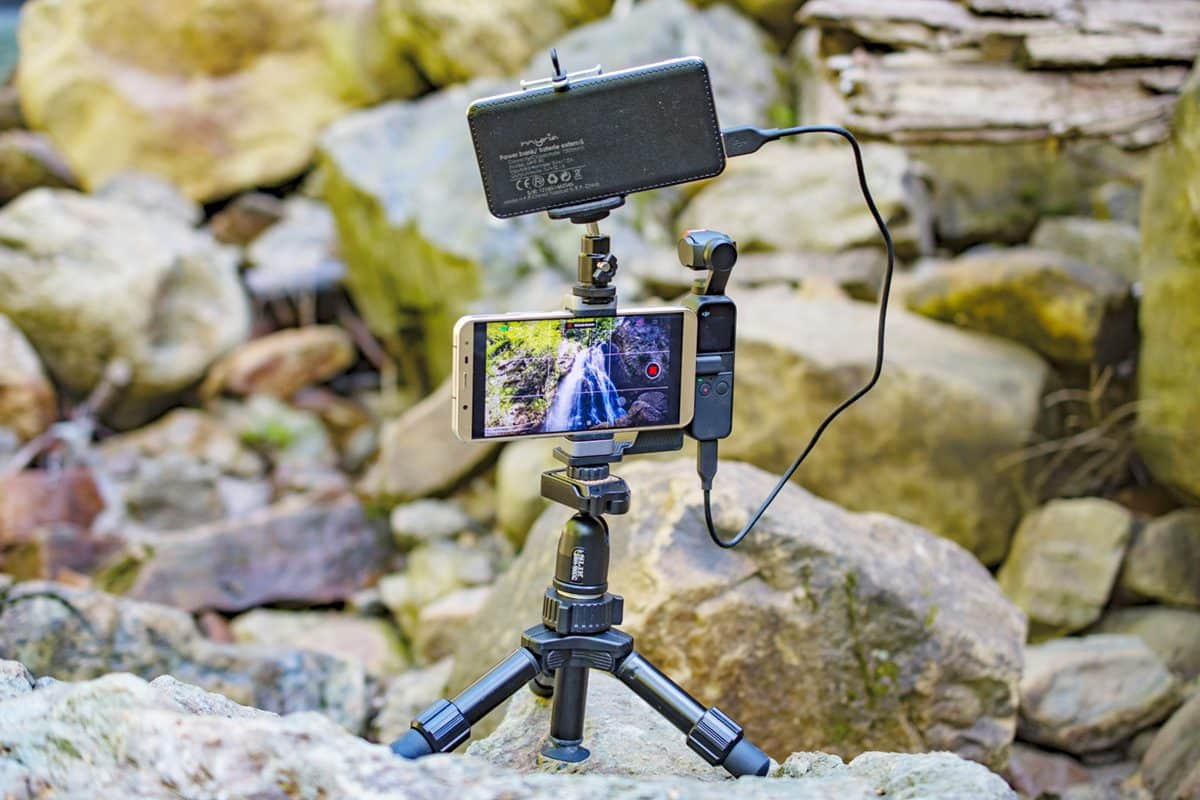
A small tripod is the first thing to buy. A locked-off shot, where the camera doesn’t move at all, looks calm and professional, and it lets you be in your own film. These fold up small enough for a backpack and turn into a selfie stick for high angles. Don’t extend them to full height in wind; keep them low and wide for the steadiest shot.
#3. Ulanzi Ombra Travel Tripod
Price: $69.95 sale (regular $89.95)
Height: 158 cm, weighs 1.1 kg
Bonus: free phone clip with purchase when we checked
Website: ulanzi.com
A full-size tripod puts your phone at eye level, which is where most film shots live. It’s also a tripod you can keep when you move up to a camera later. Look for a smooth head so slow pans and tilts don’t jerk. Our article Dynamic Shots: Essential Camera Movements for Beginner Filmmakers shows which moves to try first.
#4. Ulanzi Lino Dual Handle Phone Rig
Price: $59.95
Fits: phones up to 8.2 cm wide and 13 to 16.5 cm long
Mounts: cold shoe and 1/4-inch holes for a mic or light
Website: ulanzi.com
A rig with two handles makes handheld shots much steadier than holding a bare phone, and gives you places to mount a microphone and a small light. With a mic and a light on top, your phone becomes a small run-and-gun camera, great for documentaries and behind-the-scenes. Check your phone’s size against the rig before you buy, especially with a thick case.
#5. Hohem iSteady X3 SE Gimbal
Price: $54.90 sale (regular $64.99)
Battery: about 11 hours
Extras: AI tracking in the Hohem Joy app, detachable remote
Website: store.hohem.com
A gimbal uses motors to keep your phone level and smooth while you walk, run or follow an actor. It’s the least expensive way to get gliding shots that used to need a Steadicam. Practice before shoot day: a gimbal shot still looks best when you walk smoothly. Hohem also has the iSteady V3 on sale at $94.99 (regular $149).
#6. Insta360 Flow 2 and Flow 2 Pro Gimbals
Price: Flow 2 $109.99 | Flow 2 Pro $159.99
Built in: selfie stick, tripod and magnetic phone clamp
Pro: 360-degree tracking and Apple DockKit for iPhone apps
Website: store.insta360.com
The Flow 2 folds small and has a tripod built into the handle, so one tool does three jobs. Its tracking can follow a person around the frame, which helps when you’re filming yourself or shooting with a tiny crew. The Pro version works with many iPhone camera apps through Apple DockKit, including pro camera apps.
#7. DJI Osmo Mobile 7 and 7P Gimbals
Launch price: Osmo Mobile 7 $89 | 7P $149 (DJI, February 2025)
7P: built-in extension rod and tripod, about 10 hours battery
Note: DJI’s US online store needed a sign-in when we checked
Website: dji.com
DJI’s phone gimbals are popular and well made, with strong subject tracking. Their US availability has changed, and we couldn’t see a current price on DJI’s own US store, so check what your local store has in stock and compare it with the Hohem and Insta360 choices above before you buy.
#8. SmallRig Handheld Phone Video Rig Kit
Price: $109.99 (kit 3155)
In the kit: phone holder, two side handles and a top handle
Mounts: two cold shoes, many 1/4-inch holes
Website: smallrig.com
This kit gives you the most ways to hold and mount your phone: low-angle shots by the top handle, steady handheld by the side handles, and room on top for a mic, a light and a recorder. It’s a good choice for a school program that will share one rig across many students and many projects.
#9. Moment Case and Variable ND Filter
Case: Moment Camera Case for iPhone 17, $55
Filter: Moment VND 2-7 stop QuickLock, $59 sale (regular $90)
Note: the VND fits Pro iPhone models only
Website: shopmoment.com
On a sunny day, a phone uses a very fast shutter, which makes motion look choppy. A variable ND filter is like sunglasses for your phone: it cuts the light so you can use a film-like shutter speed with a pro camera app. Moment’s lenses ($150 each, including an anamorphic lens for a widescreen movie look) are fun, but buy them last.
#10. Anker Nano Power Bank
Price: $49.99
Capacity: 10,000 mAh, up to 30W USB-C, built-in cable
Weight: 215 g
Website: anker.com
Shooting 4K video drains a phone fast, and a dead battery ends your shoot day. Keep a power bank in your bag and charge between setups. Also clear storage space before you go. If you have an iPhone 15 Pro or newer Pro model, Apple says it can record ProRes video straight to an external USB-C drive, which saves phone space on big shoots.
Your Phone Kit by Budget
$0: books, a beanbag, good handheld habits
About $16: add a selfie stick tripod
About $76: a selfie stick tripod plus a dual-handle rig
About $121: a selfie stick tripod, a gimbal and a power bank
Pair your rig with a microphone from Gear on a Budget: Microphones and Sound and a light from Gear on a Budget: Lighting. For ideas to shoot, try Smartphone Filmmaking: 3 Fun Projects for First-Time Creators and 10 Easy Tips for Students: Filming Short Films on Your iPhones.
Put your gear to work. Our 1-Minute Film Challenge is open now. This month’s theme is Light, and you can shoot it on the phone in your pocket. Make a film of one minute or less and send it in before December 31, 2026. We would love to see your work.
Q: What phone filmmaking accessories should I buy first?
A: Start with a small tripod (under $30), then a gimbal or a dual-handle rig for moving shots. After that, a microphone makes the biggest difference. Lenses and filters come last.
Q: Do I need a gimbal to film on a phone?
A: No. Phones have good built-in stabilization, and careful handheld technique or a simple rig works well. A gimbal like the Hohem iSteady X3 SE ($54.90 on sale) helps most for long walking and running shots.
Q: Can you make a real short film with just a phone?
A: Yes. Festival films and even feature films have been shot on phones. A tripod, clean sound and good light matter far more than the phone model.
In Conclusion
Hold it still, then hold it steady, then add the extras. A $16 tripod, a $55 gimbal or a $60 rig and a power bank turn the phone you already own into a real filmmaking camera. Then go shoot something for this month’s 1-Minute Film Challenge.
The Gear on a Budget Series
Gear on a Budget: Cameras
Gear on a Budget: Microphones and Sound
Gear on a Budget: Lighting
Phone Rigs and Stabilizers (you are here)
Ready to step up? Top 10 Low Budget Filmmaking Cameras
Additional Resources
Phone Filmmaking: How to Get Steady Shots Without a Gimbal
Phone Filmmaking: The Best Camera Settings to Shoot a Film on Your Phone
Smartphone Filmmaking Tools and Tips for Beginners
iPhone Cinematography
Dynamic Shots: Essential Camera Movements for Beginner Filmmakers
Film Terms Glossary: Camera Terms
The 1-Minute Film Challenge